
Within each Contact in your SendJim account, you’ll now see a new field called Contact Type. This feature allows you to categorize and organize your contacts using one of the following options:
-
Customer- Contacts who have done business with you in the past or are currently active clients. These contacts are ideal for retention campaigns, referrals, reactivation mailings, and ongoing customer communication.
-
Lead- Contacts who have shown interest in your services but have not yet converted into a customer. This may include prospects from inquiries, estimates, website forms, or marketing campaigns. Lead contacts are best suited for nurturing and conversion-focused mailings.
- Unknown- Contacts whose relationship to your business has not yet been identified. This category is helpful for newly added contacts or imported lists where the contact’s status is unclear. You can update these contacts to Customer or Lead at any time as more information becomes available.
You can assign a Contact Type in two ways:
-
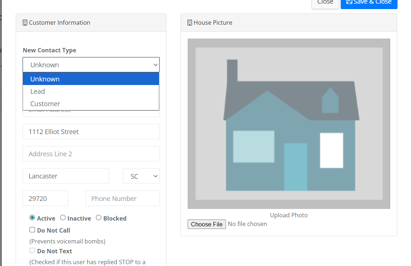
Manually – Update the Contact Type directly within an individual contact record in your SendJim account.
- Click Edit on any record and use the dropdown to select the correct Contact Type.
-
During Import – When importing contacts, include a column labeled Contact Type in your import file. SendJim will automatically apply the selected category during the import process.
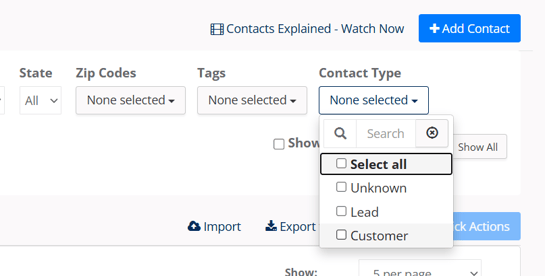
Once Contact Types are assigned, you can easily filter and sort your contacts when creating mailings and campaigns. This makes it easier to stay organized, target the right audience, and ensure your messaging is relevant and effective. Use the Contact Type dropdown to filter between the different options.
Questions? Open a Chat to Speak with a Member of Our Team.