
If you plan to use our Text Messaging feature, you'll first need to complete a registration application. This article will walk you through the process and provide guidance to help improve your chances of approval.
Please note that the registration time is usually up to 2 weeks due to processing time with our carrier.
Overview
All new A2P 10DLC Campaigns go through a vetting process to protect the messaging ecosystem for everyone and make sure everything aligns with carrier requirements and CTIA guidelines.
This guide will walk you through exactly what you need to prepare before you register, so you can get approved smoothly the first time.
Business Information
This information is necessary to identify your business.
-
Please be sure to fill in accurate and complete information.
- The phone number you add will need to be a text message enabled number.
Text Message Use Case
This section is all about defining how you will utilize the text messaging feature and who you will contact.
Pick the use case that best matches your message content. Getting this right helps reviewers understand your goal.
Standard Brand Use Cases:
- Marketing: Sending promotions, discounts, or sales offers to customers. All messages must be promotional in nature.
- Mixed: A combination of promoational AND transactions/appointment messages. Choose this is you send both types.
- Notification: Appointmentreminders, job status updates, or service alerts only. No promotional conent.
- Account Notification: Account relatedalerts only: password resets, billing notices, or longin verifications. No marketing or service content.
How will you use this number?
You will need to match this answer to the Use Case you selected. Keeping these consistent helps your registration get approved.
Good Example: We will be using text messaging for upcoming appointments and reminders, as well as promotional material.
Bad Example: To send text messages.
Sample Messages:
Provide sample messages (examples of real messages you would send) to accurately highlight the use case of your registration.
- Identify message sender (Company)
- Have your message reflect what you started you would use texting for
- Include how to opt out (Reply STOP to opt out)
Examples of Sample Messages:
-
"This is (Company Name). I am following up on the quote we provided. Are you still interested in moving forward? Reply "STOP" to opt-out".
- "This is John with (Company Name). I wanted to let you know we are offering 10% off on all projects completed in the month of July. Reply "STOP" to opt-out".
- "This is John with (Company Name). I wanted to remind you about your upcoming appointment on (Date). Please let us know if you need to reschedule. Reply "STOP" to opt-out".
User Conset
Most text message verification submissions are denied due to insufficient consent information. Make sure to provide a detailed description of how your customers consent to receive text messages.
Your description needs to include a clear description of the opt-in method(s). If you use multiple opt-in methods (like both a website form and a phone calls), provide a description for each of them.
In your description, we’re checking to make sure that the call-to-action and the right disclosures are displayed at the time of phone number collection. A call-to-action is the language that invites someone to sign up for your messaging program. Here’s what your message flow needs to include:
- Service description and name
- Example: Sign up to receive account notifications from (Company Name)
- Fee disclosure
- Example: “Message and data rates may apply” (NOTE: In the US this verbiage is required verbatim, carriers won’t approve mockups that include the word "standard" as this implies the existence of premium rate messaging, which is no longer allowed in the US.)
- Frequency
- Example: "One message per login", "Message frequency varies", "Three messages per delivery"
- Customer care contact information
- Example: "Reply HELP for help"
- Opt out instructions
- Example: "Reply STOP to opt out"
Opt In Examples:
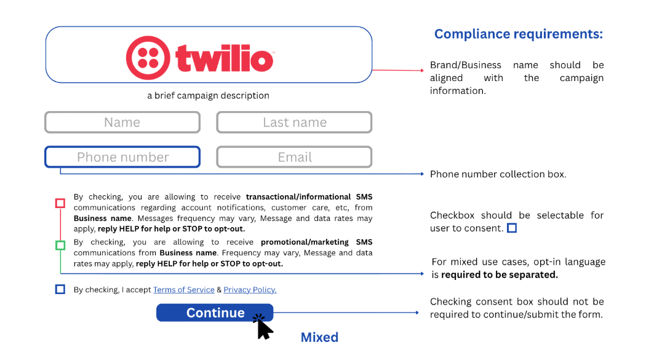
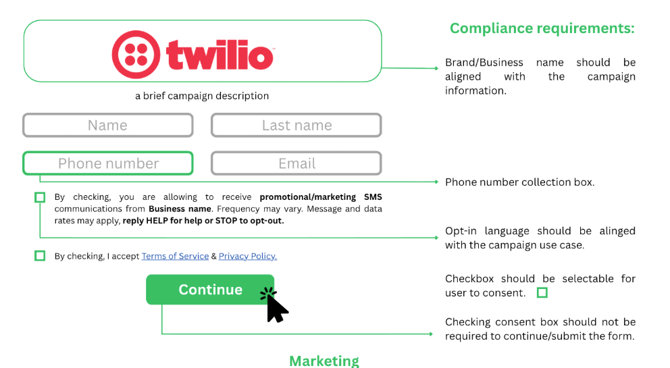
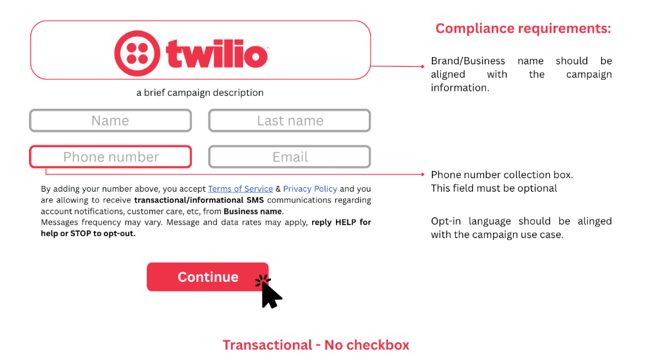
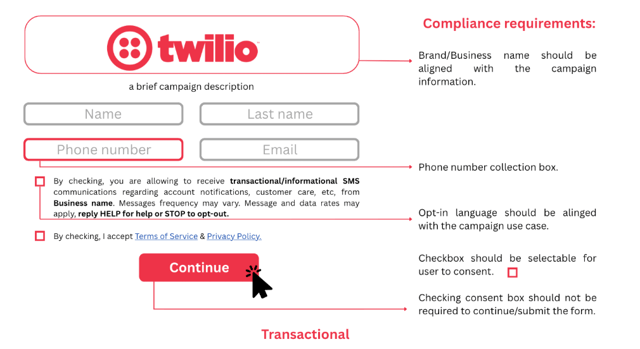
Here are some examples of web forms for both marketing and transactional use cases:
Multiple Messaging Campaign Example (Express Written Consent)
Marketing Campaign Example (Express Written Consent)
Transactional Campaign Example (Express Consent) - Phone Number Field Optional
Transactional Campaign Example (Express Consent) - Phone Number Field Required
Getting consent right
The type of messages you send determines the level of consent you need. For transactional messages (order confirmations, appointment reminders), you need basic permission. This can happen when someone provides their phone number at checkout or verbally agrees over the phone. For marketing messages (sales and promotions), you need documented proof like a checkbox, form, or keyword opt-in. Verbal opt-ins aren't allowed for marketing messages unless you include a double opt-in via the user's handset to complete the express written consent requirement.
Consent applies per campaign. If someone signs up for order updates, they haven't automatically agreed to receive promotions. You need separate opt-ins for each campaign type. Enrolling a customer into multiple campaigns based on a single opt-in will get your campaign rejected. Consent also isn't transferable, can't be assigned to others, and can't be buried in general terms and conditions.
Consent needs to be voluntary. If customers have to opt-in to messaging to complete a purchase or create an account, your registration will be rejected. Here's what that means in practice:
- Users can't be required to opt-in as a condition for completing unrelated actions (creating an account, making a purchase, or accessing services).
- Messaging consent must be separate from terms of service, privacy policies, or other agreements.
- Consent controls (checkboxes, toggles) must be blank or off by default.
| This works |
This doesn't |
| ☐ "Yes, I'd like to receive text alerts about my order" (Unchecked by default, voluntary) | ☑ "I agree to receive text messages" (Pre-checked box) |
| Separate checkbox for SMS consent, distinct from Terms of Service agreement | "By agreeing to our Terms of Service, you consent to receive promotional messages" (Consent bundled with ToS) |
| "Add my mobile number for account updates (optional)" | Phone number required to complete scheduling" with mandatory SMS opt-in |
| Separate opt-in for account updates vs. marketing messages | Single opt-in that enrolls customer in both transactional AND marketing campaigns |
Providing proof when opt-in isn't publicly visible
We need to be able to verify the opt-in method that you're describing. If your opt-in happens in any of the following situations, you'll need to provide a publicly accessible link to a screenshot (for example via Google Drive or OneDrive) directly in your message flow description:
- Behind a login or gated page
- On a paper form
- Via verbal script (IVR or agent)
- Not yet published publicly
- Part of an in-app flow
Privacy policy and Terms and Conditions
Every registration needs to include both a privacy policy and terms and conditions, and they need to meet specific requirements that protect your customers and keep you compliant with industry standards. Both are required for approval. In your privacy policy, Twilio checks for language that makes it clear that Messaging Consent data isn't being shared, sold, or bought. Here’s an example of the language we look for:
“All the above categories exclude text messaging originator opt-in data and consent; this information won’t be shared with any third parties.”
Your privacy policy must:
- Disclose what data you collect and how it’s used
- Explain that mobile information and opt-in consent won’t be shared with third parties or affiliates for marketing or promotional purposes (required by CTIA)
Your terms and conditions should generally include:
- Program or brand name
- Program description
- Message and data rates may apply disclosure
- Message frequency (or recurring message disclosure)
- Customer support contact information
- Complete opt-out instructions (HELP and STOP), displayed in bold
- Link to the privacy policy
- Disclosure that states "Carriers are not liable for any delayed or undelivered messages"
Pro tip: Consider creating messaging-specific privacy policies and terms and conditions rather than updating your main company documents. Dedicated messaging policies are easier to keep current if requirements change.
Make Sure Your Data Matches Up
Consistency matters a lot here. Reviewers will check that everything lines up:
- Brand Name: If you register as "Acme Inc" but your messages say "Contoso," reviewers will flag that mismatch.
- Email Domain: Corporate brands (like Twilio Inc) should use matching email domains, not gmail or yahoo addresses.
- Consistency across brand details: Your brand name, website, and email domain should all clearly connect to the same business. If they point to different entities, reviewers will flag the mismatch.
- Website: The URL you provide needs to be functional and represent the brand you're registering. Sites that don't load, return errors, or aren't live yet won't pass review.
- Third-party URLs: Links within the messaging content must represent the registered brand. Third-party redirects aren't permitted.
- Duplicate Brands: Creating multiple brands with the same EIN or duplicate campaigns can slow down your approval.